Free 3D cargo and container load calculator
Check whether cargo fits into containers, trailers, pallets or air freight equipment. Compare equipment needs and estimate volume, weight, loading metres and chargeable weight directly in your browser.

Plan cargo before requesting or booking transport
Move beyond a simple CBM calculation. Spoterix evaluates cargo dimensions against real equipment constraints and presents the result in a visual loading workflow.
Check cargo fit
Enter length, width, height, weight and quantity to see whether your pieces fit through the equipment door and inside the available loading space.
Compare equipment
Test cargo against selected container, trailer, pallet and air freight presets instead of relying on volume alone.
Review a 3D load plan
Inspect the proposed placement visually and review equipment count, used space, weight and other freight metrics.
Equipment available in the free Load Calculator
Start with common transport equipment and use the Pro version when you need the full catalog or custom dimensions.
| Transport type | Included example | What you can evaluate |
|---|---|---|
| Ocean freight | 20' dry and 40' high cube containers | Cargo fit, payload, volume, equipment count and 3D placement |
| Road freight | Standard trailer | Cargo fit, loading metres, payload and loading arrangement |
| Air freight | Air freight pallet (ULD) | Dimensions, weight and chargeable-weight estimate |
| Pallet planning | Euro pallet | Piece placement, stackability and occupied loading space |
Equipment dimensions and limits can vary by carrier and model. Always confirm the final plan against the equipment assigned to the shipment.
How the 3D load calculator works
Go from cargo dimensions to a visual planning result in four steps.
Add cargo
Enter dimensions, weight, quantity and relevant handling constraints for each cargo type.
Select equipment
Choose a container, trailer, pallet or air freight equipment preset.
Calculate
The packing engine tests orientations and filling strategies while respecting the selected constraints.
Review the plan
Inspect the 3D result and review equipment count, utilization, weight and freight metrics.
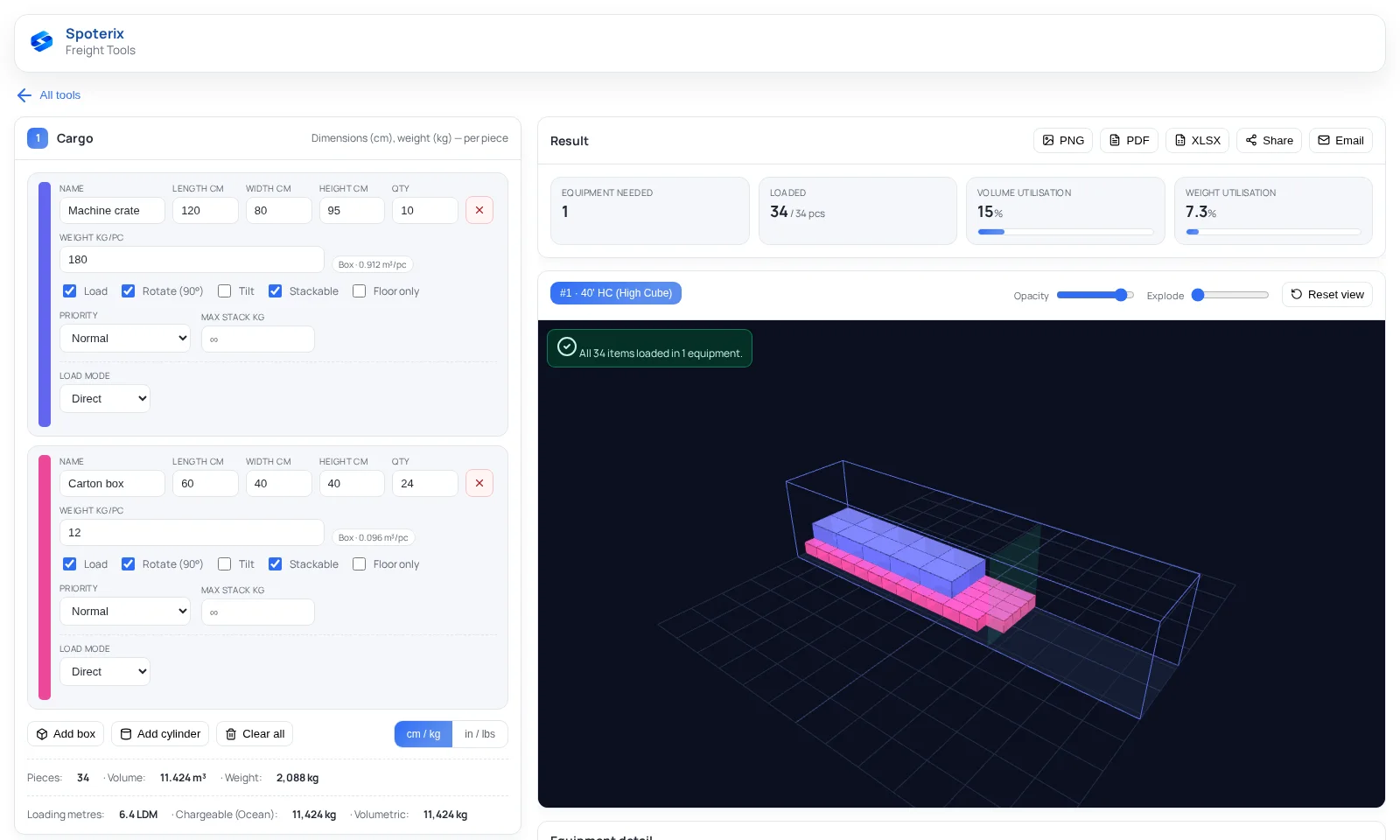
More than a container volume calculator
Total cubic volume alone cannot show whether differently sized pieces can actually be arranged inside the selected equipment.
The Spoterix packing engine tests multiple orientations and filling strategies. It considers payload, door dimensions, stackability and loading-order constraints, then aims to reduce the number of selected equipment units. This provides a more useful planning basis than dividing total cargo volume by nominal container capacity.
The result remains a planning aid. It does not replace carrier approval, certified load securing, axle-load verification, dangerous-goods checks or an on-site loading assessment. Confirm actual internal dimensions, payload and operational constraints before loading.
For the planning method itself, from cargo fit and equipment choice to loading metres, follow the Knowledge Base guide How to plan a container load.
Build and adjust more advanced load plans
Spoterix users can continue from the public calculator into a larger planning workflow.
Faster cargo input
- More cargo rows and equipment options
- AI extraction from shipping documents
- Saved and recent calculations
- Custom equipment and pallets
Review and share the result
- Lock pieces and recalculate remaining cargo
- Drag, rotate and stack pieces in the 3D view
- PDF, XLSX and PNG outputs
- Share links and email delivery
Load calculator questions
Answers to common questions from freight, export and warehouse teams.
Is the Spoterix Load Calculator free?
Yes. The public version is available directly in the browser without a login and includes two cargo rows plus selected standard equipment presets. More rows, custom equipment, saved plans and exports are available in the Pro version.
Can I calculate how many containers or trailers I need?
The calculator tests the entered cargo against the selected equipment and aims to reduce the required number of equipment units while respecting the configured fit and handling constraints.
Does it support mixed cargo sizes?
Yes. You can enter cargo rows with different dimensions, quantities and weights. The free version includes two cargo rows; the Pro version supports larger plans.
Does the calculator estimate chargeable weight?
Yes. It provides chargeable-weight estimates for air, road, ocean and courier planning alongside actual weight, volume and loading metres where applicable.
Why is a 3D loading calculation better than CBM alone?
CBM treats cargo like liquid volume. A 3D calculation also considers piece dimensions, orientation, available loading space and constraints, so it can reveal fit problems that a simple volume division misses.
Can I use the result as a certified loading plan?
No. The result is a planning aid. Final loading must be checked against the actual equipment, carrier rules, load-securing requirements and all applicable safety or dangerous-goods regulations.
Billed by weight or by volume?
The load plan answers whether the cargo fits. What the carrier actually bills is a job for the free Spoterix Chargeable Weight Calculator: volumetric and chargeable weight per piece and per shipment, for air, courier, road, rail and ocean LCL.