1. Prepare the shipment before opening the form
Collect the shipment facts from the operational owner, packing list, sales order, or transport instruction first. If the scope is still uncertain, resolve that uncertainty explicitly rather than asking suppliers to make different assumptions.
| Data group | Minimum decision | Why it matters |
|---|---|---|
| Transport and scope | Air, ocean, road, or open; door-to-door, door-to-port, or port-to-door; FCL/LCL or FTL/LTL where applicable | Defines which services and equipment suppliers should price. |
| Parties and route | Shipper, consignee, pickup and delivery locations; IATA airport codes or UN/LOCODE port codes where relevant | Prevents quotations for different lanes or handover points. |
| Schedule | Quote deadline, loading date, latest delivery date, and the intended Incoterms® rule | Aligns availability, urgency, and commercial responsibility. |
| Cargo | Commodity, packaging type, piece count, weight per piece, dimensions, stackability, and total weight | Allows suppliers to check capacity, equipment fit, and chargeable measures. |
| Special handling | Temperature, dangerous goods, security status, container or truck requirements, and required documents | Surfaces acceptance constraints before a supplier quotes. |
| Commercial basis | Base currency, all-in or itemized pricing, requested charge lines, and selection criteria | Makes totals and service content easier to compare. |
For dangerous goods, do not infer the classification from a generic product description. IATA states that the shipper is responsible for correct air-transport classification and that dangerous-goods consignors must prepare the applicable declaration. Obtain competent advice and current mode-specific documentation where required.
2. Create the Spot Request in Spoterix
Set the basics
Open New Spot Request. Add a clear internal title, select the transport mode and service scope, then choose the load type when it applies. Set the base currency and decide whether suppliers must provide an all-in total or an itemized charge breakdown. For itemized pricing, select the charge lines you need, such as pickup, base freight, fuel, customs, terminal handling, delivery, or dangerous-goods fees.
Define the route parties and locations
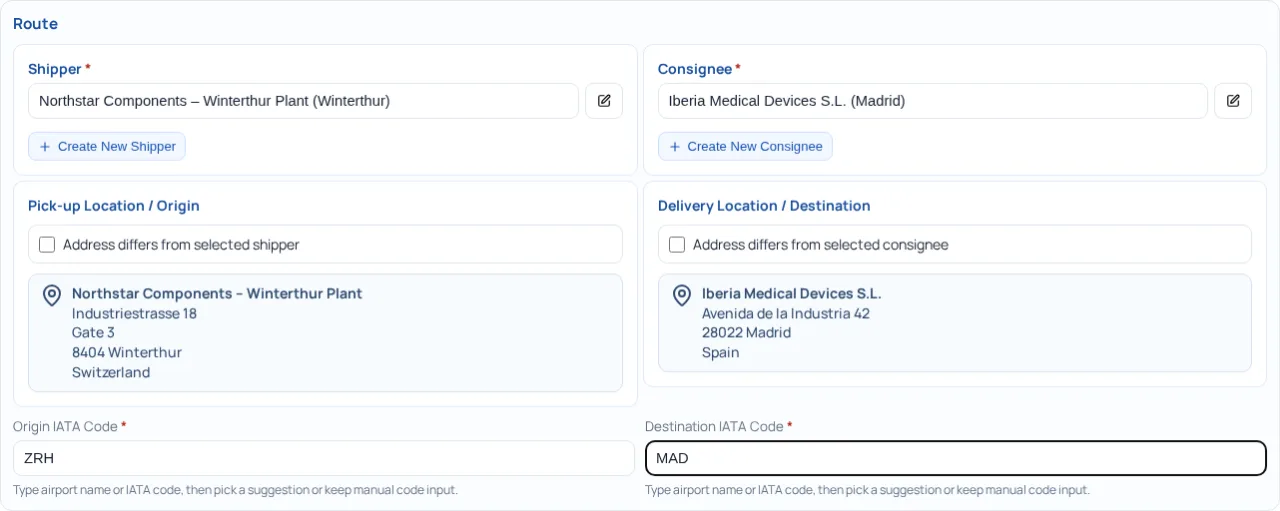
Select the shipper and consignee from your directories. By default, their saved addresses become the pickup and delivery locations. Activate the address override only when the physical pickup or delivery point differs from the commercial party. For air requests, add origin and destination IATA codes; for ocean requests, add the port codes.
Add dates, suppliers, and evaluation criteria
Choose the Incoterm, quote deadline, loading date, and latest delivery date. The deadline must be before loading, while latest delivery must be on or after loading. Then select supplier sources and at least one concrete contact. Choose one or more evaluation criteria: quickest transit time, cheapest offer, direct transit where possible, or supplier score. Criteria may be visible to suppliers or kept private.
Enter shipment and mode-specific requirements
Record every packaging line with pieces, weight per piece, and dimensions. Add packaging type, commodity, and stackability. Spoterix derives line totals from the entered pieces and weight. Complete the mode-specific fields that affect pricing: for example air-cargo security, ocean container type, reefer set point, truck type, direct-flight preference, or routing notes.
Add special requirements and documents
Flag dangerous goods, temperature control, pharmaceutical handling, and any other operational constraint. Attach supporting documents such as a packing list or commercial invoice when they reduce ambiguity. Spoterix also supports document-assisted prefilling; every extracted suggestion should still be checked against the source document.
Review before creating the request
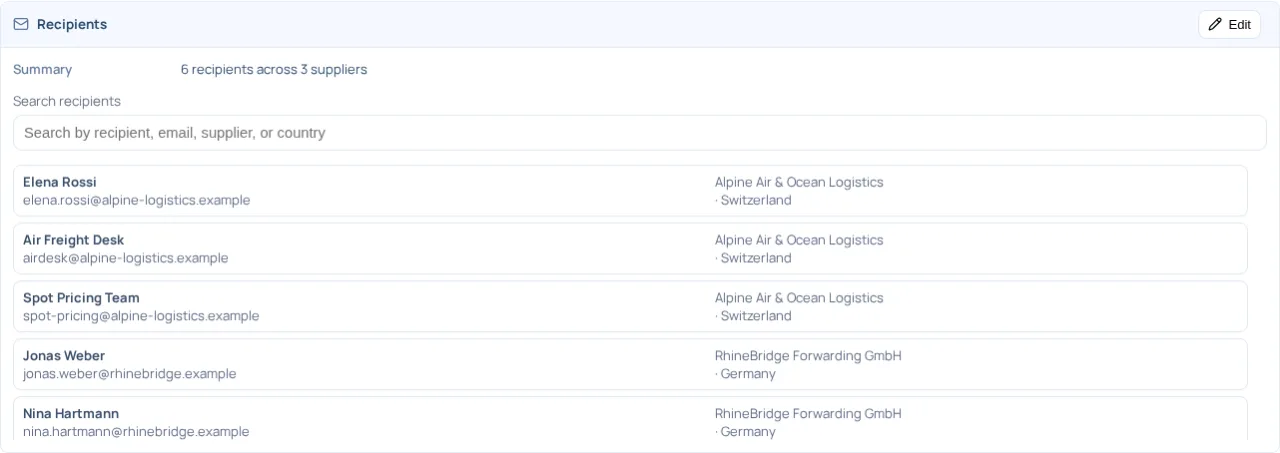
Use Review & Submit to verify the route, dates, cargo, pricing basis, selection criteria, and recipient list. Search the recipient list when many contacts are involved. Correct highlighted errors and remove unintended recipients before selecting Create Spot Request.
3. Select from your own supplier database
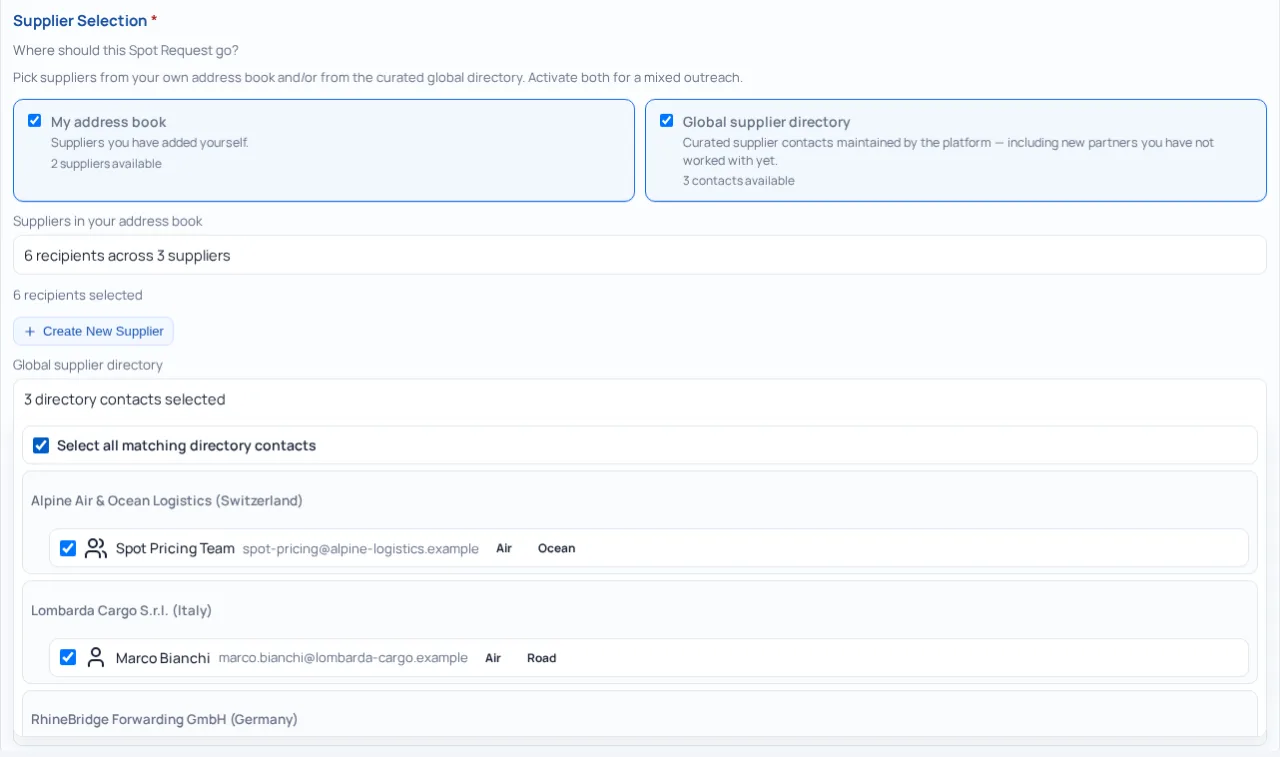
My address book contains suppliers and contacts maintained for your shipper organization. Selection happens at contact level, not only at company level. This matters when one supplier uses different people or group mailboxes for air, ocean, and road freight.
- Select the transport mode before finalizing recipients; contacts are matched to their recorded modes.
- Expand the supplier list and keep only the people or group mailboxes responsible for this lane and service.
- Create a new supplier from the wizard when the partner is not yet in your address book.
- If you change the transport mode later, review the selection again because Spoterix updates it to the new mode.
Use your own database for established commercial relationships, nominated partners, or contacts whose capability and response process you already know. Do not select every stored mailbox by habit; each added recipient receives the request.
4. Select from the Master Supplier database
The Global supplier directory exposes centrally maintained master contacts, including suppliers that are not yet in your own address book. You can activate it by itself or combine it with your own contacts for a mixed outreach.
Master contacts are also filtered by the selected transport mode. You can select individual contacts or all matching directory contacts. When the same supplier appears in both sources, Spoterix keeps the selected own and master contacts together and removes same-email duplicates from the directory result.
5. Make incoming quotes comparable
Comparable quotes begin with a controlled request. Every supplier should price the same lane, shipment, timing, and responsibility split. Use the following checks:
- One scope: state the same pickup, main carriage, customs, terminal, and delivery responsibilities for everyone.
- One commercial basis: use the same base currency and either an all-in total or the same required charge lines.
- One cargo baseline: give identical piece counts, dimensions, weights, packaging, stackability, and special-handling facts.
- One time window: keep quote deadline, readiness/loading, and required delivery dates unambiguous.
- Explicit service assumptions: request transit time, routing, equipment, free time, validity, and exclusions where they influence the decision.
- Predefined evaluation: select the criteria before offers arrive and decide which criteria suppliers may see.
6. Typical mistakes and how to avoid them
| Mistake | Consequence | Better practice |
|---|---|---|
| Entering only total weight | Suppliers cannot assess handling, capacity, dimensional weight, or equipment fit. | Enter pieces, weight per piece, dimensions, packaging, and stackability. |
| Confusing a party with a physical location | Pickup or delivery is priced to the wrong address. | Select shipper and consignee, then use an override only for a different operational location. |
| Using an Incoterm without a named place | Cost and risk boundaries remain ambiguous. | Confirm the applicable Incoterms® rule and named place in the commercial agreement and request context. |
| Mixing all-in and itemized responses | Totals contain different services and cannot be compared directly. | Set one charge-breakdown method and consistent required charge lines. |
| Inviting every available contact | Duplicate work, mailbox noise, and unclear ownership at the supplier. | Select the responsible contact or group mailbox for the mode and lane. |
| Changing mode without rechecking recipients | The contact pool may change because mode matching is reapplied. | Review the selected recipient list after every mode change. |
| Leaving special cargo until after the quote | The offer may be invalid or require re-pricing. | Declare temperature, security, dangerous goods, and handling requirements before sending. |
| Skipping final review | Wrong dates, route data, or recipients may leave the organization. | Use Review & Submit as a four-eyes checkpoint for higher-risk requests. |
7. Best-practice checklist
- Use a title that identifies the lane, cargo, or internal project without exposing unnecessary sensitive information.
- Ask the operational owner to confirm route, pieces, dimensions, weight, readiness, and special handling.
- Keep the quote deadline realistic and before loading; allow suppliers time to check capacity and partners.
- State one pricing structure and one base currency for every invitee.
- Choose contacts by responsibility, transport mode, geography, and qualification, not by volume alone.
- Attach only documents that are necessary and approved for sharing with every selected recipient.
- Review the final recipient list and all assumptions before creating the Spot Request.
- Document clarification that changes scope and, when necessary, issue an updated request to all affected suppliers.